Getting Started with WordPress and YouTube Playlists
WordPress is a powerful and flexible platform that makes it easy to create and maintain websites. If you’re new to WordPress, this guide will help you get started with a plan for using WordPress for your site and show you how to install and set up the platform.
To learn more about WordPress and how to use it for your site, there are plenty of resources available. The official WordPress documentation is a great place to start, and there are also numerous blogs, tutorials, and videos that can help you learn the ins and outs of using WordPress.

<div id="gallery-videos">
  <div class="video-gallery" style="display: grid; grid-template-columns: 1fr 1fr; gap: 10px;"><iframe src="https://www.youtube.com/embed/F0_Nbsa01FA" style="width:100%; height:200px;" frameborder="0" allowfullscreen></iframe><iframe src="https://www.youtube.com/embed/XSRTU9EMegQ" style="width:100%; height:200px;" frameborder="0" allowfullscreen></iframe><iframe src="https://www.youtube.com/embed/GTj3Q8gACAM" style="width:100%; height:200px;" frameborder="0" allowfullscreen></iframe><iframe src="https://www.youtube.com/embed/UeyxO0BFDYs" style="width:100%; height:200px;" frameborder="0" allowfullscreen></iframe></div>
</div>

<h2>Planning Your WordPress Site</h2>
Before you install WordPress, it's important to take some time to plan out what you want your site to do and how you want it to look. This will help ensure that your site is set up in a way that meets your needs and makes it easy for visitors to find the information they're looking for.
Here are some questions to consider as you plan your WordPress site:
<ul>
  <li>Will you be installing WordPress in the root directory or a subdirectory? Do you want to set up a test site first?</li>
  <li>What categories will you use to group your content? Have you created a list of these categories?</li>
  <li>What pages do you need, such as About, Contact, or Events? Have you considered what you want to include in the header of your site?</li>
  <li>Have you planned out your content strategy and a list of related topics to help you get started writing blog posts?</li>
  <li>How will you integrate social media into your WordPress site and workflow?</li>
</ul>

<h2>Installing and Setting Up WordPress</h2>
Once you've planned out your site, it's time to install and set up WordPress. You can download the latest version of WordPress from the official website, or many web hosts offer one-click installation.
After you've installed WordPress, you'll need to configure some settings to ensure that your site is set up the way you want it to be. Here are some things you should do after installing WordPress:
<ul>
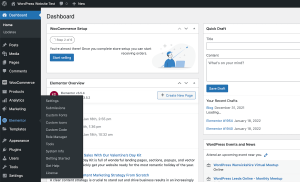
  <li>Familiarize yourself with the WordPress dashboard and admin interface.</li>
  <li>Customize your site's appearance by selecting a theme.</li>
  <li>Add any necessary functionality to your site using plugins.</li>
  <li>Create any necessary pages, such as an About page or Contact page.</li>
  <li>Configure your site's settings, such as the site title and time zone.</li>
</ul>

<h2>Embedding YouTube Playlists in WordPress</h2>
If you want to add some visual interest to your WordPress site, you might consider embedding a YouTube playlist. There are several ways to do this, including using the Smash Balloon YouTube Feed Pro plugin or adding the embed code for the playlist directly into a post or page.
Here's how to embed a YouTube playlist in WordPress using the Smash Balloon YouTube Feed Pro plugin:
<ol>
  <li>Purchase and download the Smash Balloon YouTube Feed Pro plugin from the official website.</li>
  <li>Install and activate the plugin on your WordPress site.</li>
  <li>Configure the plugin settings, including entering your license key and creating a new YouTube feed.</li>
  <li>Add the YouTube feed to any post or page using the provided shortcode.</li>
</ol>
This is an example of an HTML article with a placeholder for a video gallery. The [GALERIA_VIDEOS] tag can be replaced with any content, such as a list of embedded YouTube videos or a plugin that displays a YouTube playlist.